

Base64 encoding is one of those foundational web technologies that operates entirely behind the scenes, yet almost everything on the modern internet relies on it. Whether you are sending an email attachment, embedding a small icon directly into your CSS, or securely passing an authorization token in an HTTP header, Base64 is doing the heavy lifting.
Despite its ubiquity, Base64 is frequently misunderstood. Junior developers often confuse encoding with encryption, leading to massive security vulnerabilities. Others rely on shady, server-side online tools to decode sensitive tokens, unknowingly leaking their proprietary data to third parties.
In this comprehensive guide, we are going to demystify Base64 encoding. We will explore exactly what it is, when you should (and shouldn't) use it, why it is categorically not encryption, and why using a secure, client-side Base64 encoder and decoder tool is essential for protecting your development workflow.
What is Base64 Encoding?
At its core, computers only understand binary data—ones and zeros. When transferring binary data (like an image file, a PDF document, or compiled software) over text-based protocols like HTTP or SMTP (email), there is a high risk of corruption. Text-based protocols often misinterpret raw binary as control characters (like line breaks or end-of-file markers), completely destroying the payload.
Base64 solves this problem by translating raw binary data into a safe, text-based alphabet consisting of 64 printable ASCII characters. The alphabet uses uppercase letters (A-Z), lowercase letters (a-z), numbers (0-9), and the symbols + and /. An equals sign (=) is used for padding at the end of the string.
By representing complex binary data using only these 64 universally recognized characters, Base64 guarantees that the data will survive transmission across any text-based medium without corruption.
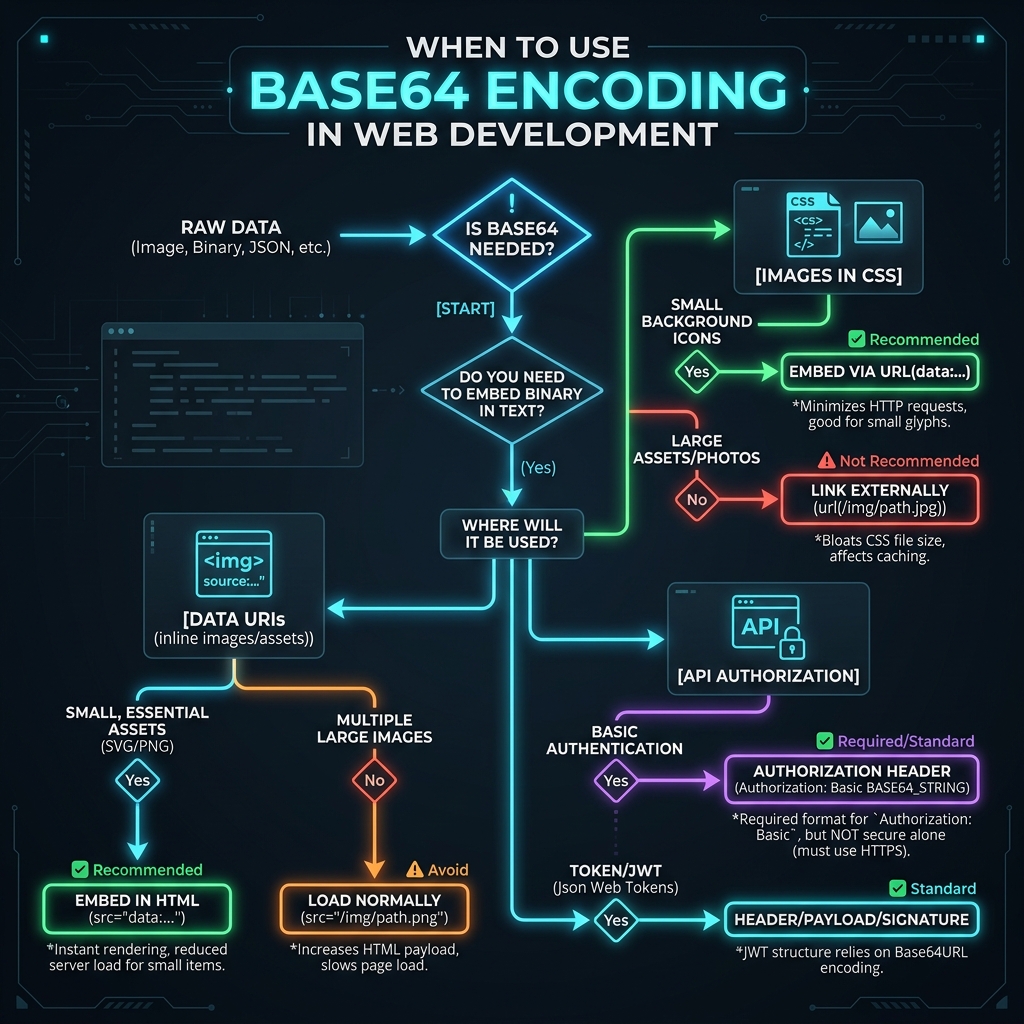
Understanding when to rely on Base64 encoding vs when to serve raw assets is a critical architectural decision.
Base64 Encoding vs. Encryption: The Deadly Confusion
This is arguably the most important section of this entire guide: Base64 is NOT encryption.
Because a Base64 string looks like random gibberish (e.g., U2VjcmV0UGFzc3dvcmQxMjM=), amateur developers sometimes assume the data is securely hidden. They will "encode" a password, an API key, or a user's credit card number in Base64 and store it in a database or pass it via a public URL, assuming it is safe.
Encoding simply changes the format of the data. Anyone with a computer can reverse a Base64 string back into readable text instantly without needing a secret key or a password. Encryption, on the other hand, mathematically scrambles data using a cryptographic key, meaning it cannot be reversed without the corresponding key.
Security Warning: Never use Base64 encoding as a mechanism to hide, protect, or secure sensitive information. If you need to secure data, use strong cryptographic hashing algorithms (like Argon2 or bcrypt) for passwords, and AES for two-way encryption.
Common Use Cases for Base64 in Modern Web Development
If it doesn't provide security, why do we use it so much? Base64 is used primarily for reliable data transmission and data embedding. Here are the most common scenarios where a web developer will encounter Base64:
1. Data URIs (Embedding Images in CSS/HTML)
Every time a browser encounters an <img src="icon.png"> tag, it must make a separate HTTP request to the server to fetch that image. For small icons and UI elements, the overhead of the HTTP request is actually larger than the image itself.
Developers bypass this by converting the image to a Base64 string and embedding it directly into the HTML or CSS using a Data URI: src="data:image/png;base64,iVBORw0KGgoAAAANSUhEUgAA...".
Because the image data is embedded inline, the browser doesn't have to make an extra request, which can dramatically speed up page rendering.
2. HTTP Basic Authentication
When you visit a website that prompts you for a username and password via a standard browser popup, you are likely interacting with HTTP Basic Authentication. Under the hood, the browser combines your username and password with a colon (username:password), Base64 encodes that string, and sends it to the server in the Authorization: Basic header.
Because this is easily decodable by anyone intercepting the network traffic, HTTP Basic Auth must always be used over a secure HTTPS (TLS) connection.
3. JWTs (JSON Web Tokens)
Modern web applications often use JWTs for stateless user authentication. A JWT consists of three parts (Header, Payload, Signature) separated by dots. The Header and Payload are always Base64URL encoded (a slightly modified version of Base64 that is safe for URLs). If you want to dive deeper into how JWTs operate, be sure to check out our Free JWT Decoder, Viewer & Validator guide.
The Hidden Dangers of Online Base64 Decoders
As a developer, when you encounter a mysterious Base64 string in a log file, a database, or an HTTP header, your first instinct is to Google "Base64 Decoder" and paste the string into the first result you find.
This is extremely dangerous.
Many free online developer tools run on backend servers. When you paste your Base64 string into their textbox and click "Decode," your browser sends that payload across the internet to their server. The server decodes it and sends the plain text back to your screen.
If that Base64 string contained a production API key, a customer's JWT authentication token, or a basic auth credential, you just handed that sensitive data directly to an unknown third party. They could be logging every payload they receive and quietly harvesting credentials.
Why Client-Side Processing is the Only Safe Option
To protect your data, you must use tools that operate entirely within your browser using client-side JavaScript. With a client-side tool, the decoding process happens on your local CPU. The data never leaves your computer, and no network requests are made.
Our tools at ToolkitsPlus are built on this exact philosophy. Whether you are using our Base64 Decoder, our JSON Formatter, or our Password Generator, everything executes locally. You can even disconnect your internet after loading the page, and the tools will continue to function perfectly. This zero-trust architecture ensures your proprietary data remains yours.
Frequently Asked Questions (FAQ)
1. Does Base64 encoding reduce file size?
No, it actually increases file size. Because Base64 uses only 64 characters to represent 256 possible byte values, the resulting encoded string will always be roughly 33% larger than the original raw binary data. Therefore, you should avoid Base64 encoding massive files (like large high-res videos) unless absolutely necessary for the transmission protocol.
2. What are the equals signs (=) at the end of a Base64 string?
The equals signs are padding characters. Base64 encoding processes data in chunks of 3 bytes (24 bits). If the raw data isn't perfectly divisible by 3 bytes, the algorithm adds one or two equals signs at the end of the string to "pad" it out so the decoder knows how to handle the final chunk correctly.
3. What is Base64URL?
Standard Base64 uses the + and / characters. However, in URLs, these characters have special meanings (like separating path directories). Base64URL is a modified version that replaces the + with a minus sign (-) and the / with an underscore (_), making the resulting string safe to pass in URL query parameters without breaking the web server's routing.
Conclusion
Base64 encoding is an elegant solution to a very old problem: moving complex binary data safely across text-based systems. It is not encryption, it is not a security measure, and it will increase the size of your payloads.
As long as you understand its purpose—and as long as you rely on secure, client-side decoding tools that respect your privacy—Base64 will remain one of the most reliable and heavily used utilities in your web development toolkit. Always decode responsibly, and protect your credentials.