

If you work as a web developer, data analyst, or backend engineer, you deal with JSON data every single day. Whether you are consuming a third-party REST API, writing configuration files, or moving massive datasets between microservices, JSON (JavaScript Object Notation) is the undisputed king of data interchange formats.
But there is a major problem that every developer eventually faces: raw, unformatted JSON is practically unreadable. When an API returns a massive, single-line string of data spanning 10,000 characters without any whitespace or line breaks, identifying a single typo or missing property becomes a nightmare. This is exactly why finding the best JSON formatter and validator online is critical for your daily productivity and debugging workflow.
In this comprehensive guide, we are going to explore everything you need to know about JSON formatting. We will break down why JSON is structured the way it is, common errors that break your parsers, how schema validation works, and why using a dedicated tool like our completely free JSON Formatter & Validator can save you hours of pulling your hair out over a missing comma.
What is JSON and Why is Formatting So Important?
JSON was popularized in the early 2000s by Douglas Crockford as a lightweight, text-based, language-independent data exchange format. It was designed to be easy for humans to read and write, and easy for machines to parse and generate. Unlike XML, which relies on heavy tags, JSON uses a minimalistic structure of key-value pairs (objects) and ordered lists (arrays).
However, to save bandwidth and improve network transfer speeds, production APIs usually return JSON in a minified state. Minification strips out all unnecessary whitespace, spaces, tabs, and carriage returns. For a computer, {id:1,name:"John"} is exactly the same as a beautifully indented block of code. But for human eyes, reading a 500-kilobyte minified response is impossible.
This is where a JSON Formatter becomes indispensable. By pasting your minified string into an online formatter, the tool parses the data and reconstructs it with proper indentation (usually 2 or 4 spaces per nesting level), color-coded syntax highlighting, and collapsible tree-view nodes.
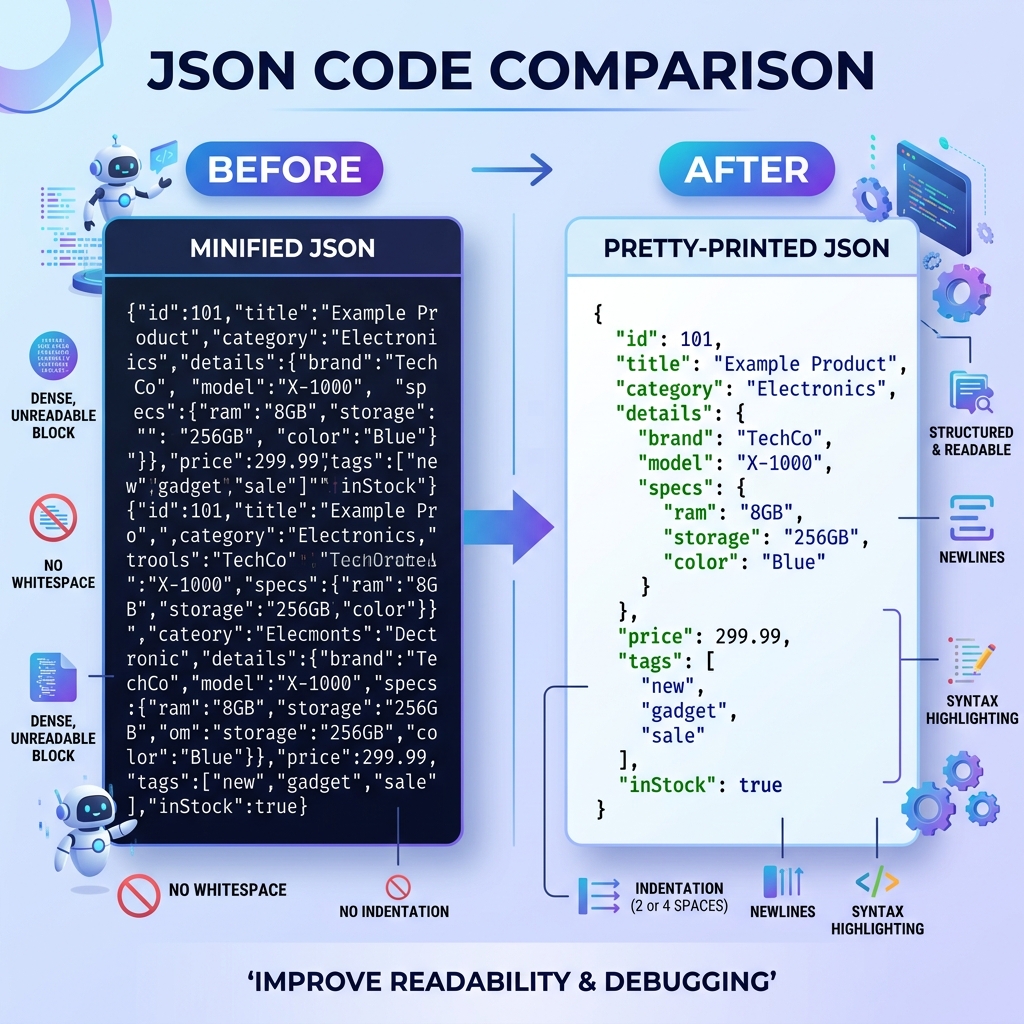
Minified JSON is great for machines, but humans need proper indentation and syntax highlighting to make sense of complex data structures.
The Dual Role: Formatting vs. Validation
It is important to distinguish between formatting (often called "pretty printing") and validating. While they often happen simultaneously in the best online tools, they serve different purposes.
1. JSON Formatting
Formatting is purely aesthetic. It takes a valid (or mostly valid) JSON string and applies visual structure. It aligns brackets, indents nested objects, and adds color to keys, strings, numbers, and booleans. A good formatter also allows you to collapse and expand nodes, which is an absolute necessity when you are trying to navigate a payload with deeply nested arrays.
2. JSON Validation
Validation is structural and logical. A JSON Validator checks your input against the strict rules of the JSON specification (RFC 8259). If you have a single syntax error—like a trailing comma or an unescaped character—the validator will immediately halt, highlight the exact line and character where the parsing failed, and provide a human-readable error message.
Without a validator, you are relying on your application compiler or runtime environment to throw an error, which often results in generic "Unexpected token } in JSON at position 409" messages that give you no real context on how to fix the issue.
Top 5 Most Common JSON Syntax Errors
Even senior developers make mistakes when manually writing or editing JSON configurations. Because the specification is notoriously strict, the slightest typo will invalidate the entire file. Here are the top five errors our validators catch on a daily basis:
- Trailing Commas: Unlike modern JavaScript, Python, or Go, the JSON spec strictly forbids trailing commas at the end of objects or arrays. If the last item in your list has a comma after it, the parser will fail.
- Single Quotes Instead of Double Quotes: In JSON, all strings—including object keys—must be wrapped in double quotes (
"). Using single quotes (') is valid JavaScript but invalid JSON. - Unquoted Keys: While JavaScript allows you to write object properties without quotes (e.g.,
{ name: "John" }), JSON requires all keys to be double-quoted (e.g.,{ "name": "John" }). - Including Comments: The JSON specification does not support comments of any kind (neither
//nor/* */). Developers often try to document configuration files likepackage.jsonortsconfig.jsonand inadvertently break the parsing. - Improper Character Escaping: If your string value contains a double quote, a backslash, or a control character like a newline, it must be properly escaped (e.g.,
\",\\,\n). Failing to escape these characters will prematurely terminate the string and trigger a syntax error.
Pro Tip: When writing configuration files that require human comments, consider using alternative formats like YAML or TOML, or extensions like JSON5, which relax the strictness of standard JSON.
How to Use JSON Schema for Advanced Validation
Basic syntax validation ensures your code won't crash the parser. However, it does not guarantee that the data contains the right information. For instance, what if your application expects a user object to contain an "email" field, but the API returned a "username" field instead? The JSON is syntactically valid, but your application logic will still break.
This is where JSON Schema comes into play. JSON Schema is a powerful vocabulary that allows you to annotate and validate the structure, format, and data types of your JSON documents.
By defining a schema, you can enforce rules such as:
- The
"age"property must be an integer greater than or equal to 18. - The
"email"property must match a specific regular expression for email validation. - The
"tags"array must contain at least one item, and all items must be strings. - The properties
"id"and"name"are strictly required, while"phone"is optional.
Using a JSON validator that supports JSON Schema checking allows you to mock APIs, build contract-driven development pipelines, and ensure backward compatibility when your data structures evolve over time.
Why Security Matters in Online Formatting Tools
As developers, we frequently handle highly sensitive data: authentication tokens, personally identifiable information (PII) from user databases, financial transaction payloads, and proprietary business logic.
Pasting this data into a random, unverified online formatting tool is a massive security risk. Many low-quality online tools send your pasted input to their backend servers to process the formatting, which means your sensitive API payloads are being transmitted across the web and potentially logged in their server databases.
When choosing the best JSON formatter, you must ensure that it processes data client-side. Client-side processing means that the JavaScript executing the formatting and validation runs entirely within your browser. Your data never leaves your local machine, no network requests are made with your payload, and nothing is stored on external servers.
At ToolkitsPlus, our JSON Formatter Tool is built with a zero-trust, client-side-first architecture. Whether you are formatting public dummy data or highly confidential production API responses, you can use our tool with total peace of mind knowing your data remains strictly on your device.
Streamlining Your Development Workflow
Relying on a great JSON formatting tool is just one step in optimizing your development environment. In the modern web ecosystem, transforming data quickly is key to maintaining momentum.
Often, you will find yourself needing to move data between different formats. For example, a business analyst might hand you an Excel spreadsheet or a CSV file containing hundreds of rows of user data, and you need to seed your NoSQL database with that information. In these scenarios, chaining tools together becomes incredibly powerful. You can use our CSV to JSON Converter to instantly map those tabular rows into nested JSON arrays, and then immediately run the output through the validator to ensure the structural integrity of your new dataset.
By keeping these browser-based, instant-loading tools bookmarked, you eliminate the friction of writing custom Python parsing scripts or wrestling with complex IDE plugins just to read a simple data payload.
Frequently Asked Questions (FAQ)
1. Is JSON case-sensitive?
Yes, JSON is entirely case-sensitive. The keys "Name" and "name" are treated as two completely distinct properties. Furthermore, boolean values and null must be strictly lowercase (true, false, null). Using True or Null will trigger a parsing error.
2. Can I convert JSON to CSV or Excel?
Yes. Because JSON arrays often represent lists of similar objects (much like rows in a database), they can be flattened and converted back into CSV or Excel formats using online converters or scripts. However, deeply nested JSON structures may require complex flattening logic to map properly into two-dimensional columns.
3. How large can a JSON file be?
The JSON specification does not define a maximum file size. The limit is entirely dependent on the memory and processing power of the system parsing the file. Most modern web browsers and Node.js environments can comfortably parse JSON strings up to several hundred megabytes. However, for files exceeding 1GB, you should look into streaming parsers rather than loading the entire file into memory at once.
4. Why does my JSON parser throw an error on trailing commas?
The JSON format was designed to be as simple and unambiguous as possible. While JavaScript allows trailing commas to make version control diffs cleaner, the formal JSON spec strictly requires that commas only be used to separate elements. A trailing comma implies another element is coming, and when it doesn't, the parser fails. Always remove trailing commas before validating.
Conclusion
JSON is the lifeblood of the modern web. From configuring your frontend build tools to acting as the communication bridge between massive microservice architectures, mastering how to read, write, and debug JSON data is a non-negotiable skill for any tech professional.
Stop squinting at minified walls of text and guessing where you missed a quotation mark. Bookmark a fast, secure, client-side tool like our Free JSON Formatter & Validator to automate the heavy lifting. By integrating robust formatting and validation practices into your daily workflow, you will catch bugs earlier, collaborate with your team more effectively, and spend less time debugging and more time building.