

If you have built a modern web application, mobile app, or REST API in the last five years, you have almost certainly encountered a JSON Web Token (JWT). JWTs have become the absolute standard for stateless authentication, replacing legacy session cookies in microservice architectures and single-page applications (SPAs).
However, JWTs can be frustratingly opaque. When a user logs in and the server responds with a massive, dot-separated string of gibberish, it can feel like a black box. If an API request fails with an HTTP 401 Unauthorized error, how do you know if the token expired, if the user roles are missing, or if the signature is invalid?
In this guide, we are going to crack open the black box. We will explore the internal anatomy of a JSON Web Token, discuss the massive security implications of exposing payload data, and demonstrate why utilizing a free, secure JWT decoder and viewer is an absolute necessity for debugging modern authentication flows.
The Anatomy of a JSON Web Token
Despite looking like a random string of cryptographic hash, a JWT is actually a highly structured data packet. It is composed of exactly three distinct parts, separated by periods (.): Header.Payload.Signature.
The first two parts (Header and Payload) are merely Base64URL encoded. They are not encrypted. Let's break down what each section does.
1. The Header (Red)
The header typically consists of two parts: the type of the token (which is JWT), and the signing algorithm being used, such as HMAC SHA256 (HS256) or RSA (RS256). For example:
{
"alg": "HS256",
"typ": "JWT"
}
This JSON object is then Base64URL encoded to form the first part of the JWT.
2. The Payload (Purple)
The second part of the token is the payload, which contains the "claims." Claims are statements about an entity (typically, the user) and additional data. There are three types of claims:
- Registered claims: Predefined, recommended claims like
iss(issuer),exp(expiration time), andsub(subject). - Public claims: Custom claims defined by the developer, but registered in the IANA JSON Web Token Registry to avoid collisions.
- Private claims: Custom data shared between parties, like
{ "role": "admin" }.
This payload object is then Base64URL encoded to form the second part of the JWT.
3. The Signature (Blue)
This is where the actual security happens. To create the signature, the issuing server takes the encoded header, the encoded payload, a secret key (known only to the server), and the algorithm specified in the header, and mathematically hashes them together.
When the client sends the JWT back to the server, the server recalculates the signature using its secret key. If the calculated signature matches the signature attached to the token, the server knows the token is completely legitimate and hasn't been tampered with.
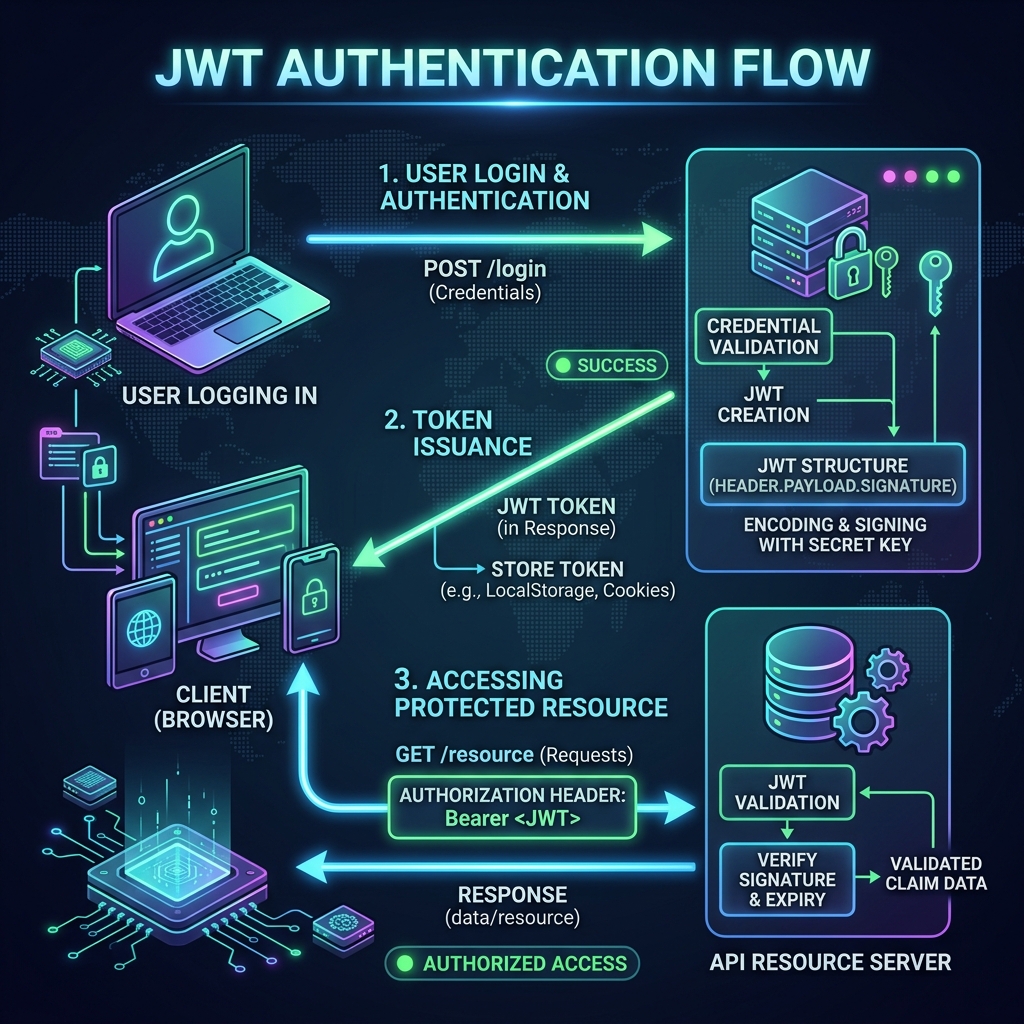
The standard JWT authentication flow: Token generation on login, storage on the client, and verification on subsequent requests.
The Golden Rule: Never Store Sensitive Data in a JWT
Because the Header and Payload are just Base64URL encoded JSON, anyone can decode and read them. You do not need the server's secret key to read a JWT; the secret key is only required to verify or create the signature.
Security Warning: Never put passwords, social security numbers, credit card details, or any confidential user data inside a JWT payload. The token acts like a postcard, not a sealed letter. Anyone who intercepts it can read the message.
The payload should only contain non-sensitive identifiers, like a User ID, an email address, or authorization roles. If you must send sensitive data in a token format, you should use JWE (JSON Web Encryption) rather than standard JWT.
Debugging Authentication with a JWT Viewer
When a frontend developer receives a 401 Unauthorized or 403 Forbidden from a backend API, the JWT is the first place they should look. Is the token expired? Did the backend forget to inject the role: "admin" claim?
To inspect the token, you need a JWT Viewer. A viewer parses the three dot-separated Base64URL segments, decodes the Header and Payload into readable JSON, and displays the claims.
However, just like with JSON formatting and Base64 decoding, security and privacy are paramount.
Tokens usually grant full access to a user's account. If you paste a live production JWT into a shady online decoder that sends the token to a backend server, you have essentially handed over the keys to the castle. A malicious site could steal your token and immediately make API requests impersonating you.
This is why you must use a 100% client-side tool. At ToolkitsPlus, our online developer utilities perform all decoding and formatting entirely in your browser using JavaScript. No tokens are ever transmitted across the network, ensuring complete zero-trust security.
JWTs vs. Traditional Session Cookies
Why did the industry move away from cookies toward JWTs? The primary reason is scalability.
With traditional sessions, the server must store a Session ID in a database (like Redis) and look it up every time a user makes a request. If you have 10 million active users, that is 10 million database lookups per minute.
JWTs are stateless. All the data required to verify the user is contained within the token itself. The server simply recalculates the signature using its secret key in CPU memory. No database lookup is required, allowing APIs to scale horizontally with massive efficiency.
Frequently Asked Questions (FAQ)
1. Can a JWT be revoked before it expires?
Because JWTs are stateless, they cannot be natively "revoked" without server-side tracking (which defeats the purpose of statelessness). If a token is stolen, it remains valid until the exp claim time passes. The industry standard solution is to keep JWT lifetimes very short (e.g., 15 minutes) and issue a long-lived "Refresh Token" that the server does track and can revoke.
2. Where is the safest place to store a JWT on the frontend?
This is highly debated. Storing it in localStorage makes it vulnerable to Cross-Site Scripting (XSS) attacks. Storing it in an HttpOnly cookie protects against XSS but makes it vulnerable to Cross-Site Request Forgery (CSRF). Most modern security experts recommend short-lived tokens in memory or HttpOnly cookies coupled with CSRF tokens.
3. How do I format the JSON payload once it is decoded?
If a JWT payload contains a massive amount of custom claims, you can copy the decoded JSON object and paste it into our JSON Formatter Tool to pretty-print the data, validate its structure, and use tree-views to navigate nested arrays.
Conclusion
JSON Web Tokens have completely revolutionized how APIs handle authentication. By offloading session state from databases directly to cryptographic signatures on the client, web applications can scale faster and cheaper than ever before.
However, with great power comes great responsibility. Understanding the anatomy of the token, knowing what data is safe to include in the payload, and verifying claims using a secure, client-side JWT decoder are mandatory skills for modern developers.