

In the world of data engineering and web development, two formats dominate the landscape: CSV (Comma-Separated Values) and JSON (JavaScript Object Notation). While CSV remains the universally accepted standard for exporting spreadsheet data from tools like Microsoft Excel, Google Sheets, and legacy SQL databases, it is notoriously difficult to work with inside modern JavaScript applications.
JSON, on the other hand, is the native language of the web. It is how REST APIs communicate, how NoSQL databases like MongoDB store records, and how frontend frameworks like React and Vue consume data.
Bridging the gap between the business logic (which lives in CSVs) and the application logic (which requires JSON) is a daily chore. In this guide, we are going to explore the technical nuances of translating tabular data into hierarchical JSON structures, the pitfalls of manual parsing, and why using a fast, free CSV to JSON converter tool is the most efficient way to maintain your data integrity.
The Anatomy of a CSV to JSON Transformation
A CSV file is flat. It is a two-dimensional grid composed of rows and columns. The very first row is typically the "header" row, defining the names of the columns (e.g., id, firstName, lastName, email). Every subsequent row represents a single data record, with values separated by commas.
JSON is hierarchical. It consists of nested objects and arrays. When you convert a CSV to JSON, you are essentially instructing a parser to read the header row, and then iterate through every following row, mapping the column headers as object keys, and the row data as object values. The final result is a JSON Array containing multiple JSON Objects.
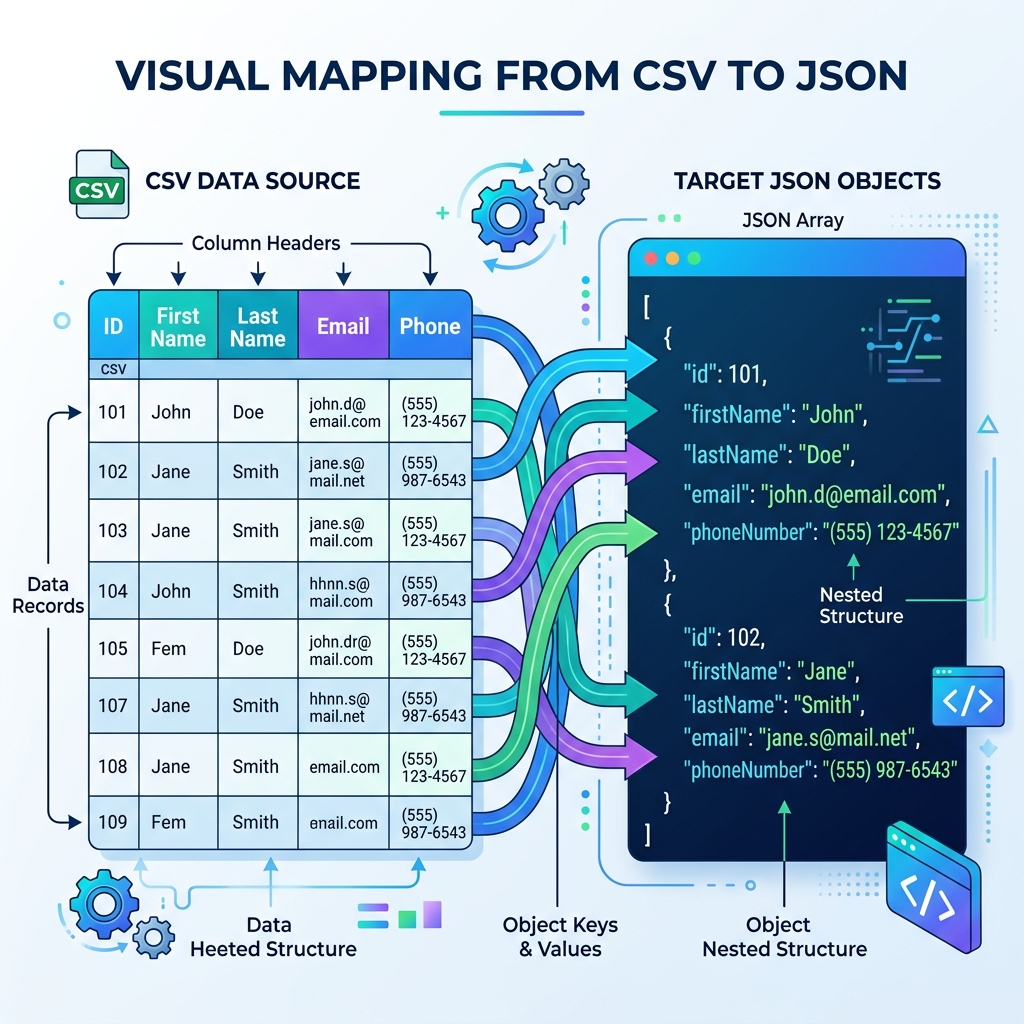
A visual representation of how a flat CSV grid is transformed into a structured array of JSON objects.
The Hidden Dangers of Manual CSV Parsing
If converting CSV to JSON just involves splitting a string by commas, you might be tempted to write your own five-line JavaScript function to do it:const rows = csv.split('\n'); const data = rows.map(r => r.split(','));
Do not do this. Writing a custom CSV parser is a notorious rookie mistake that will inevitably lead to corrupt data in production. The CSV format is deceptively complex. Here are the edge cases that will break a naive split-by-comma script:
- Commas inside values: What happens if a user's address is
"123 Main St, Apt 4"? If you split by comma, you will split the address into two separate columns, breaking the entire row's alignment. Valid CSV handles this by wrapping the value in double quotes, but a naive script won't recognize that. - Newlines inside values: Sometimes a single cell in a spreadsheet contains a line break (like a multi-line product description). A basic script splitting by
\nwill assume the line break is the end of the row, tearing your data record in half. - Escaped quotes: If a value actually contains a double quote character, the CSV spec requires it to be escaped by a second double quote (
""). Handling escape sequences manually is tedious and error-prone. - Different delimiters: While "CSV" implies commas, European systems often use semicolons (
;) because they use commas for decimal points. Tab-Separated Values (TSV) are also incredibly common.
Because of these edge cases, you should always rely on robust, spec-compliant parsers. If you are coding this yourself, use libraries like PapaParse. If you are doing a one-off conversion, use a dedicated online tool.
Why Use an Online CSV to JSON Converter?
As a developer, your time is incredibly valuable. If a client hands you a 50,000-row CSV file containing their historical sales data and asks you to import it into a MongoDB collection, writing a custom Node.js script to parse, format, and save the JSON could take 30 minutes to an hour of development and testing time.
By using a specialized CSV to JSON Converter, you can drag and drop that file into your browser and get the resulting JSON array instantly. You can then take that JSON array and pass it directly to our JSON Formatter to minify it before running your database import command.
Client-Side Processing for Data Privacy
Much like our discussions around Base64 encoding and JSON formatting, security must be your top priority. CSV files often contain the most sensitive data an organization possesses: customer emails, physical addresses, financial records, and medical data.
Uploading a CSV file to a random converter website that processes the data on a backend server is a severe violation of data privacy laws (like GDPR and CCPA). The tool you use must process the file locally in your browser using the HTML5 File API and Web Workers. This guarantees that your sensitive spreadsheet never leaves your machine.
Advanced Formatting: Handling Data Types
One inherent limitation of the CSV format is that everything is a string. If a column contains the number 42, the CSV parser reads it as the text string "42". If a column contains TRUE, it is read as the string "TRUE".
When converting to JSON, you usually want these values mapped to their proper native data types. A high-quality converter will feature "Type Inference." It will scan the column, realize that every value is numeric, and strip the quotes from the JSON output so you get a native integer instead of a string. This saves you from having to run a massive parseInt() cleanup loop on the resulting data.
Developer Tip: Before converting massive CSV files (100MB+), check if your database supports native CSV importing. Tools like PostgreSQL's COPY command or MongoDB's mongoimport --type csv are highly optimized for direct ingestion and bypass the need for a JSON middleman.
Frequently Asked Questions (FAQ)
1. Can I convert a CSV into nested JSON objects?
By default, CSV to JSON converters create a flat array of objects, where the CSV headers become the keys. Creating deeply nested JSON from a CSV (e.g., nesting an "address" object inside a "user" object) typically requires specialized syntax in your CSV headers, like dot notation (user.address.city). If your converter supports this, it will automatically nest the resulting output.
2. How large of a CSV file can I convert online?
Because secure converters run entirely in your browser, the size limit depends on your computer's available RAM. Modern browsers can comfortably parse and convert CSV files up to 50MB to 100MB in seconds. For files larger than that, the browser tab may freeze or crash due to memory exhaustion, and you should consider using a command-line script instead.
3. What if my CSV doesn't have a header row?
If your CSV lacks headers, the parser will not know what to name the keys in the resulting JSON objects. Most online tools will either use the first row of data as headers (resulting in broken keys) or will generate generic keys like Column1, Column2. It is highly recommended that you manually add a header row to your CSV before conversion.
Conclusion
The friction between flat spreadsheet data and hierarchical web data is a constant hurdle in software development. While it is tempting to write quick scripts to bridge the gap, the edge cases inherent in the CSV specification make manual parsing a dangerous game.
By leveraging a dedicated, secure, client-side CSV to JSON Converter Tool, you can instantly translate complex tabular data into pristine JSON arrays ready for your API or database. Save your engineering hours for the hard problems, and let the utilities handle the formatting.