

Building a beautiful website is only half the battle. If your underlying HTML structure, meta tags, and internal link architecture are broken, search engine crawlers will abandon your site long before indexing your hard work. When managing large-scale content portfolios, we frequently see brilliant articles completely buried on page 10 of Google simply because the webmaster failed to run a basic technical audit.
Relying on "guesswork SEO" is the fastest way to bleed organic traffic. The modern Google algorithm is incredibly strict regarding Core Web Vitals, mobile responsiveness, and accurate schema markup. To compete in highly saturated niches, you cannot afford simple syntax errors in your header tags or bloated image payloads. This is why utilizing a technical Advanced SEO Analyzer is non-negotiable for anyone serious about digital growth.
The Anatomy of a Technical Audit
A technical SEO audit is essentially an X-ray of your website's source code. When Googlebot visits your URL, it doesn't "see" your beautiful CSS layout; it reads the raw DOM tree. If that tree is missing critical branches—such as an H1 tag or a properly defined Canonical URL—the bot assumes the content is low quality or duplicative.
In our experience optimizing high-traffic React applications, the most common silent killer of rankings is a missing or truncated Meta Description. The Meta Description is your exact sales pitch on the search engine results page (SERP). If you leave it blank, Google will arbitrarily pull a random sentence from your page, which often reads terribly out of context, decimating your Click-Through Rate (CTR). A proper analyzer instantly flags these missing attributes before you hit publish.
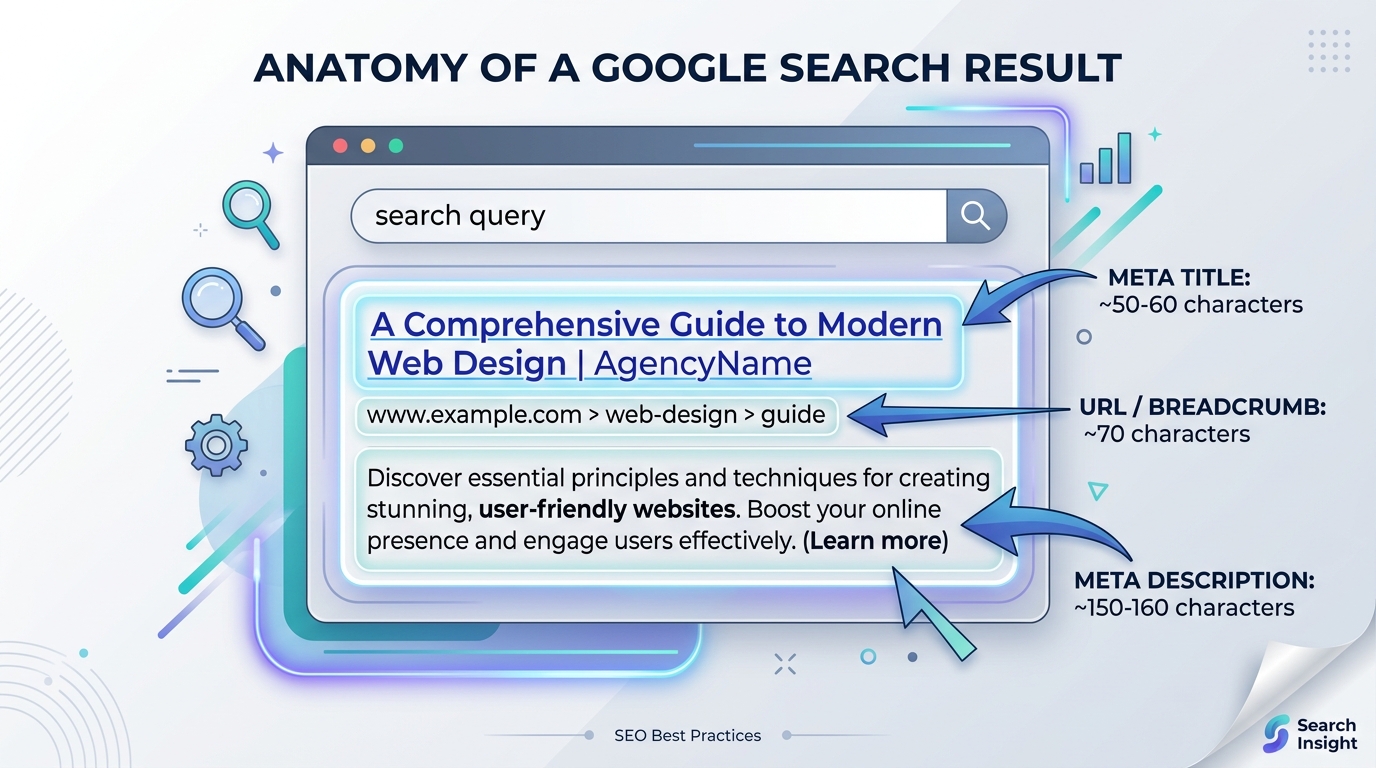
A high-quality SERP snippet requires precise character counts. Exceeding the pixel limit results in truncation, hurting your CTR.
Case Study: E-Commerce Crawl Budget
Consider a rapidly growing boutique e-commerce store running on a massive Shopify catalog. They noticed that despite publishing dozens of new products daily, their organic traffic had flatlined. Upon running a deep technical audit, they discovered a catastrophic error: their faceted navigation filters were generating thousands of dynamic URLs (e.g., `?color=red&size=medium`), and none of them had canonical tags pointing back to the main product page.
Googlebot was wasting its entire "crawl budget" reading thousands of duplicate parameter pages, completely ignoring their high-margin new products. By identifying this structural failure through an SEO analyzer, they implemented strict canonicalization. Within three weeks, their new product indexation speed increased by 400%, leading to an immediate spike in organic sales.
Expert Tips for Technical Optimization
- Enforce Strict Hierarchy: Never skip heading levels. An H3 should only ever exist inside an H2. Breaking semantic structure confuses screen readers and search bots.
- Compress Everything: Large images destroy your Largest Contentful Paint (LCP) score. Run everything through an optimizer before uploading.
- Check Link Health: A broken outbound link (404) signals to Google that your content is outdated and unmaintained. Audit your external links quarterly.
- Leverage Structured Data: Implementing JSON-LD schema (like FAQPage or Article) significantly increases your chances of capturing rich snippets and "People Also Ask" boxes.
Official Guidance: Always cross-reference your audit findings directly with the Google Search Central SEO Starter Guide to ensure you are adhering strictly to their documented best practices.
Frequently Asked Questions (FAQ)
1. How often should I run a full technical SEO audit?
For active blogs or e-commerce sites pushing new content weekly, a lightweight audit should be performed monthly. A comprehensive, site-wide structural audit is recommended every quarter to catch broken links and indexation bloat.
2. What is a "Good" page speed score for SEO?
Google expects your Largest Contentful Paint (LCP) to occur within 2.5 seconds. If your page takes longer than 4.0 seconds to load, it is officially classified as "Poor" and will suffer ranking penalties, especially on mobile networks.
3. Does Domain Age impact technical audit scores?
No. Technical SEO evaluates the structural integrity of your current HTML, not your history. A brand new website with flawless code will outrank a ten-year-old domain if the older domain is riddled with 404 errors and slow rendering times. You can check your domain history utilizing a Domain Lookup Tool.
4. Are missing Alt Tags really that detrimental?
Yes. Alt tags are not just for accessibility (screen readers); they provide direct context to search bots about the visual content of the page. Omitting them guarantees that your images will never rank in Google Image Search, cutting off a massive source of secondary traffic.