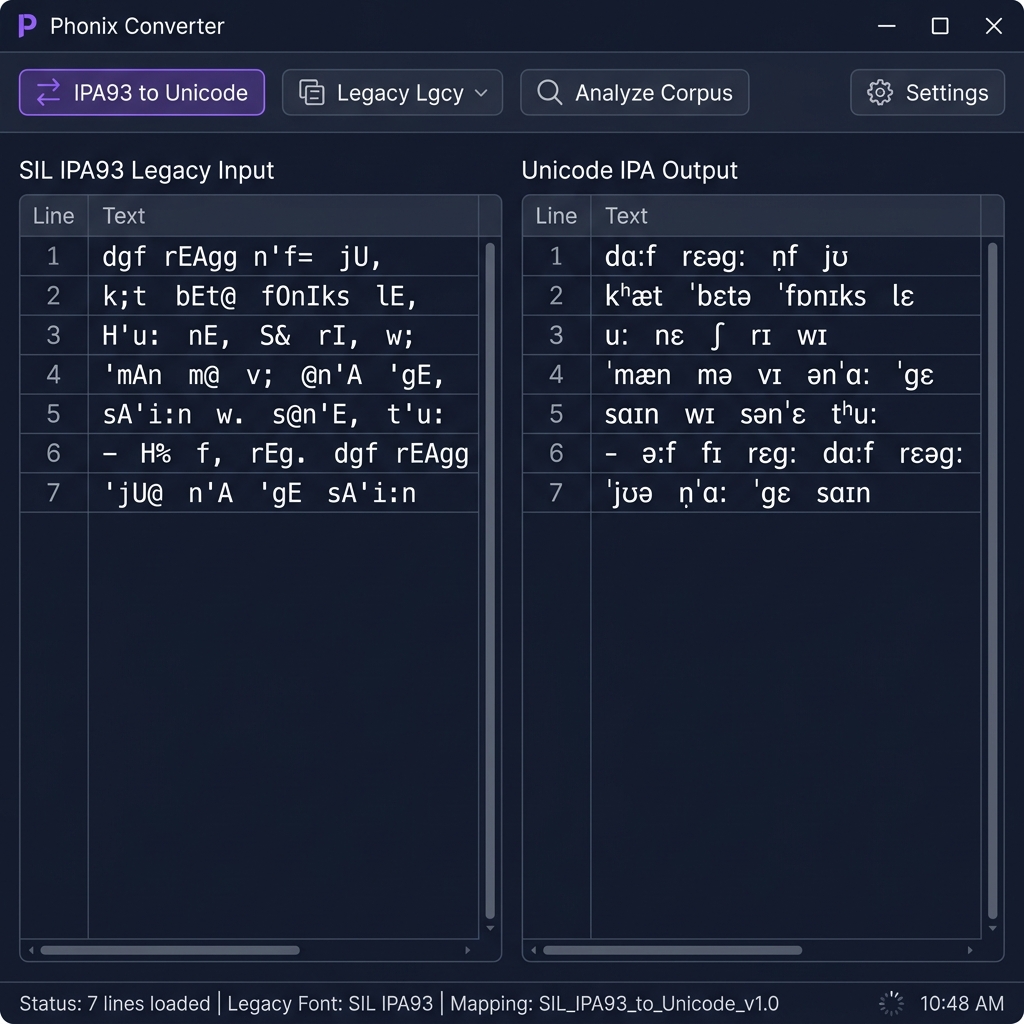
Regional Academia Font Converter — 100% Secure & Private.
SIL IPA93 Legacy
Unicode
Source Input
Live Output
What is SIL IPA93 Font?
SIL IPA93 is a legacy encoding used for Academia regional script typing. Because it maps characters to standard keyboard keys rather than Unicode positions, this tool is required to convert SIL IPA93 text into modern Unicode for web display and digital publishing.
Privacy & Offline Support
Our SIL IPA93 font converter runs entirely in your browser. None of the text you type or convert is sent to any server. This makes it perfect for private document processing and ensures zero data leaks.
Quick Guide
1
Paste your SIL IPA93 text into the source input area.
2
The tool will instantly convert it to standard Unicode below.
3
Click 'Copy Result' to use the Unicode text anywhere online.
4
Use the Vicerversa (Swap) button to convert from Unicode back to SIL IPA93.
Technical Specs
Encoding Engine
Our high-performance engine uses a two-pass mapping system to resolve character swaps and script-specific vowel reordering rules, ensuring that your text remains linguistically accurate after conversion.
Unicode is the industry standard for consistent encoding, representation, and handling of text across most of the world's writing systems. Legacy fonts like SIL IPA93 were designed before Unicode adoption.
Verified by Expert Editorial Team
SIL IPA93 to Unicode Converter — Complete Phonetics Guide
Convert legacy SIL IPA93 font text to standard Unicode IPA symbols instantly. Free, offline-ready, browser-based tool for linguists, phoneticians, language researchers, and academic institutions. No data is ever sent to a server.
The SIL IPA93 to Unicode Converter is a specialized, professional-grade digital utility engineered for linguists, phoneticians, speech-language pathologists, language documentation researchers, and academic institutions worldwide. If you have ever opened an old transcription file, a fieldwork notebook digitized in the 1990s, or a doctoral dissertation only to see a column of garbled ASCII characters where IPA symbols should appear — this tool was built precisely for you.
The problem is a fundamental encoding mismatch. The SIL IPA93 font family was created by SIL International (Summer Institute of Linguistics) before the Unicode standard fully matured. Like dozens of other regional legacy font systems, it assigned visually correct IPA glyphs to standard Latin-1 byte positions — so the text looked right on screen, but the underlying data was simply ASCII characters wearing a disguise. Our converter strips away that disguise and permanently replaces every legacy byte with its correct, universally recognized Unicode IPA symbol.
The History of SIL IPA Fonts
The International Phonetic Association published its first full IPA Chart in 1888, standardizing a set of symbols capable of representing the sounds of any human language. For the first century of the IPA's existence, these symbols were printed exclusively in physical books and journals — there was no digital equivalent.
When personal computing arrived, linguists urgently needed a way to type and print IPA symbols. Standard ASCII keyboards only supported 128 characters — nowhere near enough to cover the hundreds of IPA letters, diacritics, and suprasegmental markers. SIL International, a faith-based linguistic organization responsible for documenting thousands of world languages, became a pioneer in solving this problem. They developed several IPA font families — most notably the SIL IPA93 series (also referred to as the IPA Doulos, IPA Sophia, and IPA Manuscript series, released around version 2.00 in 1993-1995).
These fonts worked by remapping the Latin-1 extended character set (byte values 0–255) to display IPA symbols. For example, when you typed the ASCII character for capital A (byte value 65), the screen would display the IPA cursive alpha symbol ɑ. The font made the substitution visually, but the file on disk still stored 65, the byte code for Latin capital A. This was a clever engineering solution for the time, but it created a deep compatibility problem that persists to this day.
Why Legacy IPA Text Appears as Gibberish
The root cause of broken SIL IPA93 text is simple: the font acts as a visual filter, not an encoding. The moment you remove that specific font from the equation — by opening the file on a different computer, copying the text into an email, viewing it in a web browser, or importing it into a modern database — the visual filter disappears and the raw underlying bytes are exposed. Those bytes spell out standard ASCII characters, which is why a word like /ˈbɛtə/ (the IPA for "better") might appear as something like ÊbEt@ in plain text.
This affects an enormous volume of linguistic data. Fieldwork transcriptions, language documentation corpora, phonology textbooks, speech therapy assessment records, and doctoral dissertations produced between roughly 1990 and 2010 are all at risk. Many of these documents contain irreplaceable primary data on endangered languages — languages with no other living speakers. Recovering their IPA content is not merely a technical convenience; it is a matter of linguistic heritage preservation.
A key difference from other legacy font systems (such as Preeti for Nepali or Kruti Dev for Hindi) is that SIL IPA93 targets the Latin Extended byte range (values above 127) heavily. Many IPA symbols — the schwa ə, the epsilon ɛ, the eng ŋ, small capitals like ɪ and ʙ — were mapped to high byte positions (128–255), which are the positions reserved for national characters in Latin-1. This makes recovery especially tricky without a precise, complete mapping table.
How the Conversion Engine Works
Our SIL IPA93 to Unicode converter uses a byte-level character substitution approach derived from the official Ipa93.pdf specification document published by SIL International, cross-referenced against the open-source ipa2unicode library (MIT License, OHSU CSLU). The mapping covers all 150+ officially documented glyph-access codes from the Ipa93 font family.
The conversion process works entirely in your browser, client-side, using JavaScript. Here is the step-by-step logic:
Step 1 — Input: You paste or type your SIL IPA93-encoded text into the source panel.
Step 2 — Byte Scan: The engine iterates through the input character by character, reading the raw JavaScript character code for each glyph.
Step 3 — Lookup: Each character code is looked up against our comprehensive SIL_IPA93_TO_UNICODE_MAP. If a mapping exists, the corresponding Unicode IPA symbol is substituted. If no mapping exists (for instance, a newline or a digit), the character is preserved exactly as-is.
Step 4 — Output: The resulting string of real Unicode IPA characters is displayed instantly in the output panel, ready to copy into any modern document, database, or web application.
The reverse direction — Unicode to SIL IPA93 — is also supported. The reverse map is built dynamically by inverting the lookup table (first match wins for multi-value entries like diacritic width variants).
SIL IPA93 Character Mapping Table
The following table documents the most commonly used SIL IPA93 glyph-access codes, their corresponding Unicode IPA symbols, official Unicode codepoints, and IPA names. This is an essential reference for anyone manually auditing legacy transcription files.
IPA93 Byte
Latin Key
Unicode IPA
Codepoint
IPA Name
65
A
ɑ
U+0251
Open Back Unrounded Vowel (cursive a)
69
E
ɛ
U+025B
Open-Mid Front Unrounded Vowel (epsilon)
73
I
ɪ
U+026A
Near-Close Near-Front Unrounded Vowel (small cap I)
78
N
ŋ
U+014B
Voiced Velar Nasal (eng)
81
Q
æ
U+00E6
Near-Open Front Unrounded Vowel (ash)
83
S
ʃ
U+0283
Voiceless Palato-alveolar Sibilant (esh)
90
Z
ʒ
U+0292
Voiced Palato-alveolar Sibilant (yogh)
141
ì (0x8D)
ɔ
U+0254
Open-Mid Back Rounded Vowel (open o)
171
« (0xAB)
ə
U+0259
Mid Central Vowel (schwa)
199
Ç (0xC7)
ˌ
U+02CC
Modifier Letter Low Vertical Line (secondary stress)
200
È (0xC8)
ˈ
U+02C8
Modifier Letter Vertical Line (primary stress)
249
ù (0xF9)
ː
U+02D0
Modifier Letter Triangular Colon (length mark)
The full mapping covers 150+ character codes, including all IPA pulmonic consonants, non-pulmonic consonants (clicks, implosives, ejectives), vowels, diacritics, suprasegmentals, and tone bars. The complete table is embedded in our open converter engine and cross-checked against the official Ipa93.pdf document.
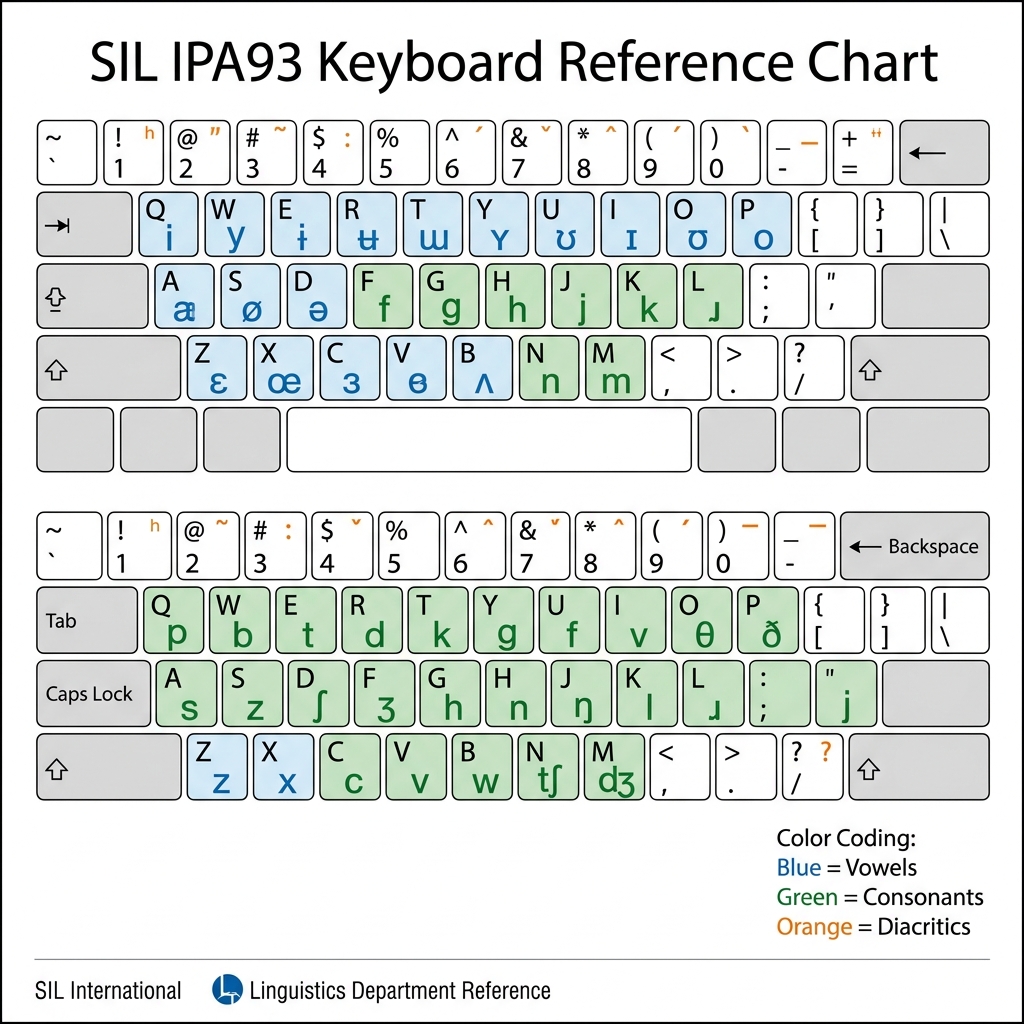
Keyboard Reference Chart
The image above illustrates how the SIL IPA93 font family remapped standard keyboard keys to IPA symbols. Several patterns are observable:
Uppercase letters (A–Z, byte 65–90) were used for the most visually distinct IPA symbols — those that share no visual similarity with their Latin counterparts. For example, A→ɑ, B→β, D→ð, E→ɛ, I→ɪ, N→ŋ.
Lowercase letters (a–z, byte 97–122) mostly mapped to their visually identical Unicode counterparts (a→a, b→b, etc.), preserving the basic Latin inventory.
Extended Latin positions (byte 128–255) were used for all the specialized IPA characters that have no standard keyboard equivalents — the schwa ə, the epsilon family, hooktop consonants, small capitals, and diacritics.
Who Uses This Tool and Why
This converter serves a specific but critically important set of professional communities:
Linguistic Field Researchers: Decades of fieldwork transcriptions recorded in the 1990s and early 2000s are stored in SIL IPA93 format. Converting these archives to Unicode is essential for incorporating historical data into modern language documentation databases like ELAR or AILLA.
Academic Linguists and Phonologists: Many published journal articles, conference papers, and textbooks from the 1990s–2000s contain IPA transcriptions in SIL IPA93. Digital versions of these texts — especially those stored in early PDF formats or plain-text repositories — may display as garbled characters.
Speech-Language Pathologists (SLPs): Assessment tools, clinical notes, and research corpora produced before the mid-2000s (such as data related to the MOSS Aphasia MAPPD dataset) may use SIL IPA93 encoding.
University Libraries and Archives: Institutional repositories digitizing pre-Unicode linguistics manuscripts, especially in North American and European universities where SIL tools were widely distributed.
Language Technology Developers: NLP engineers building phonemic transcription pipelines or building pronunciation lexicons from legacy datasets need clean Unicode IPA to train text-to-speech (TTS) and automatic speech recognition (ASR) models.
Modern Unicode IPA Alternatives
While our converter is the best solution for recovering legacy SIL IPA93 data, for any new IPA transcription work, you should use modern, Unicode-compliant tools from the start. SIL International itself strongly recommends this transition and has produced excellent free replacements:
Doulos SIL: The Unicode successor to the SIL IPA fonts. A comprehensive, open-source, free download from SIL that renders the complete IPA inventory using standard Unicode codepoints.
Charis SIL: Another free SIL Unicode font with a slightly more typographically refined character set, widely preferred for academic publications.
SIL IPA Keyman Keyboard: A free, modern keyboard layout from Keyman that lets you type Unicode IPA symbols directly from any standard keyboard.
SAMPA / X-SAMPA: If you are working in computational linguistics, consider also our X-SAMPA to Unicode IPA Converter, which handles the ASCII-based phonetic transcription standard used in speech technology pipelines.
Quick answers to common questions about this utility.
7 Frequently Asked Questions
What exactly is SIL IPA93 and why does my text appear as garbled characters?
SIL IPA93 is a legacy, non-Unicode font family created by SIL International in the early 1990s to enable IPA phonetic transcription before Unicode support was widespread. It works by mapping IPA symbols to standard ASCII/Latin-1 byte positions — so the text only looks correct when that specific font is installed. Without the font, a modern system displays the raw underlying ASCII characters instead, which look like garbled English letters and punctuation. This converter permanently replaces those bytes with the correct Unicode IPA symbols.
Does this converter handle all SIL IPA93 symbols, including diacritics and tone marks?
Yes. The conversion engine covers all 150+ officially documented glyph-access codes from the Ipa93.pdf specification, including all pulmonic consonants, non-pulmonic consonants (clicks, implosives, ejectives), the complete IPA vowel quadrilateral, suprasegmentals (stress marks, length marks, syllable boundaries), all diacritics (nasalization tildes, voicing wedges, aspirate superscripts, etc.), and the five IPA tone bar levels plus contour tones.
Is my text data safe when I use this tool?
Completely. The entire conversion process runs locally inside your web browser using JavaScript. No text is ever transmitted to any server, logged, stored, or analyzed. This makes it safe to process sensitive data such as unpublished research transcriptions, clinical speech therapy records, or confidential language documentation.
Can I convert Unicode IPA text back into SIL IPA93 legacy format?
Yes. The tool is fully bidirectional. Switch to the 'Unicode → Legacy' mode using the mode buttons above the converter panels. This is useful if you need to produce documents compatible with legacy DTP software or pre-Unicode word processors that require SIL IPA93 fonts to render IPA correctly.
Why does the IPA93 font look correct in some PDF files but broken in others?
PDFs can embed fonts, which is why some older PDFs display IPA93 text correctly — the font glyphs are baked into the file. However, when that text is extracted (copy-pasted, scraped, or processed by a text parser), the font embedding is lost and only the raw bytes remain. Our converter fixes the extracted raw byte data.
What is the difference between SIL IPA93 and X-SAMPA?
Both are ASCII-based systems for representing IPA symbols, but they work very differently. SIL IPA93 is a visual font-based approach where one ASCII character displays as one IPA symbol via font substitution — the mapping is glyph-level and depends on an installed font. X-SAMPA (and its superset SAMPA) is a pure text-based notation where sequences of standard ASCII characters represent phonemes (e.g., 'D' for ð, 'S' for ʃ). X-SAMPA was designed for computational linguistics pipelines and does not require any special font. We have a separate X-SAMPA converter available at /tools/font-converter/sampa-ipa.
Does this work for all variants of the SIL IPA font family — Doulos, Sophia, Manuscript?
The core glyph-access codes documented in the Ipa93.pdf specification are shared across the SIL IPA93 Doulos, Sophia, and Manuscript typeface variants — they use the same encoding, only differing in visual design (serif/sans-serif styles). Our converter handles all three correctly since the underlying byte-to-IPA mapping is identical.