

The landscape of digital communication in Nepal has undergone a massive transformation over the past decade. For years, typing in Nepali meant relying on specialized legacy fonts—most notably, the iconic Preeti font. Anyone working in government offices, print media, or documentation prior to the widespread adoption of smartphones remembers the exact keyboard layout required to make Preeti work. However, the internet operates on a universal standard called Unicode. This creates a significant bridge that needs crossing: how do you take thousands of documents written in Preeti and make them readable on modern web browsers, social media platforms, and mobile devices without losing the original meaning?
This comprehensive guide delves deep into the history of Nepali typing, the technical mechanics of font conversion, and why our Preeti to Unicode Converter is an essential tool for modern digital workflows. Whether you are a seasoned typist who still prefers the tactile familiarity of the Preeti keyboard layout or a young professional tasked with digitizing older archives, understanding this conversion process is absolutely vital.
1. The Legacy of Preeti Font in Nepal
To truly appreciate the necessity of Unicode conversion, one must understand the legacy of the Preeti font. Developed in the early days of desktop publishing in Nepal, Preeti was revolutionary. Before its inception, typing in Devanagari script on a computer was a complex and often frustrating endeavor. Preeti essentially mapped Devanagari characters to the standard QWERTY English keyboard layout. For example, pressing the English letter 'a' would produce a specific Nepali character, pressing 'b' would produce another, and so on.
Because of its intuitive mapping for those who learned it, Preeti became the gold standard. Typing institutes across Kathmandu and throughout the country taught the Preeti layout. It became the de facto standard for government documents, national newspapers, academic publications, and personal letters. Entire generations of typists built incredible muscle memory based exclusively on this specific font.
However, Preeti has a fundamental flaw in the modern digital age: it is not a true language script encoding; it is merely a visual overlay. A computer reading a Preeti document doesn't inherently know that the text is Nepali. It simply sees English characters disguised in a Nepali visual style. If you copy text from a Preeti document and paste it into Facebook or an email, the recipient will just see a string of random English letters and symbols—gibberish—unless they also have the exact same Preeti font file installed on their device.
2. The Rise of Unicode: A Global Standard
Enter Unicode. The Unicode Consortium was established with a singular, ambitious goal: to create a universal character encoding standard that assigns a unique number to every single character in every language on Earth. Unlike legacy fonts that trick the computer into displaying a different shape for an English letter, Unicode fundamentally tells the computer, "This is the Nepali letter 'क' (Ka)."
The adoption of Unicode for the Devanagari script completely revolutionized digital communication in South Asia. Suddenly, you didn't need to install custom fonts to read Nepali websites. You could type Nepali directly into search engines, send Nepali text messages that could be read on any mobile phone regardless of the manufacturer, and write Nepali emails that displayed perfectly for the recipient. Unicode brought the Nepali language into the global digital ecosystem.
3. Why Do We Still Need Converters?
If Unicode is so superior, why do we still talk about Preeti? Why are online font conversion tools dedicated to this translation so popular in Nepal? There are three primary reasons:
- The Muscle Memory Factor: Thousands of professional typists, journalists, and government workers have spent decades mastering the Preeti keyboard layout. They can type incredibly fast using Preeti. Asking them to switch to a Romanized Unicode layout or a traditional Unicode layout often dramatically reduces their productivity. A converter allows them to continue typing in the way they are most comfortable, while outputting modern, shareable Unicode text.
- The Archival Problem: There is a massive repository of existing digital documents—books, legal records, articles, and reports—that were saved as Preeti encoded Word documents or PDFs. To publish these archives on modern websites or databases, the text must be converted. Manually retyping millions of pages is impossible; an automated conversion tool is the only viable solution.
- Design and Print Media: While Unicode is perfect for the web, many graphic designers and print houses still prefer legacy fonts for specific aesthetic layouts in software like Adobe InDesign or CorelDraw. They often need to convert text back and forth between Unicode (received from writers) and Preeti (used for final print layout).
4. How Preeti to Unicode Conversion Works Technically
Converting Preeti to Unicode is not as simple as swapping out characters one-to-one. The Preeti font relies heavily on complex combinations of keystrokes to create half-letters, joined characters (ligatures), and specific vowel placements (matras).
For instance, in Preeti, typing a character with a specific vowel might require you to type the vowel symbol first, followed by the consonant, simply because of how the font was designed to render on screen. In Unicode, the logical structure of the language is preserved: you always type the consonant first, followed by the vowel, and the rendering engine handles the visual display.
A high-quality converter must use an intelligent parsing algorithm. It reads the incoming string of Preeti keystrokes, identifies patterns, reorders characters to match logical linguistic rules, and then replaces them with the correct Unicode Devanagari hex values. This is why poorly coded converters often produce spelling errors or broken half-characters; they fail to account for the complex reordering required by the transition from a visual encoding to a logical encoding.
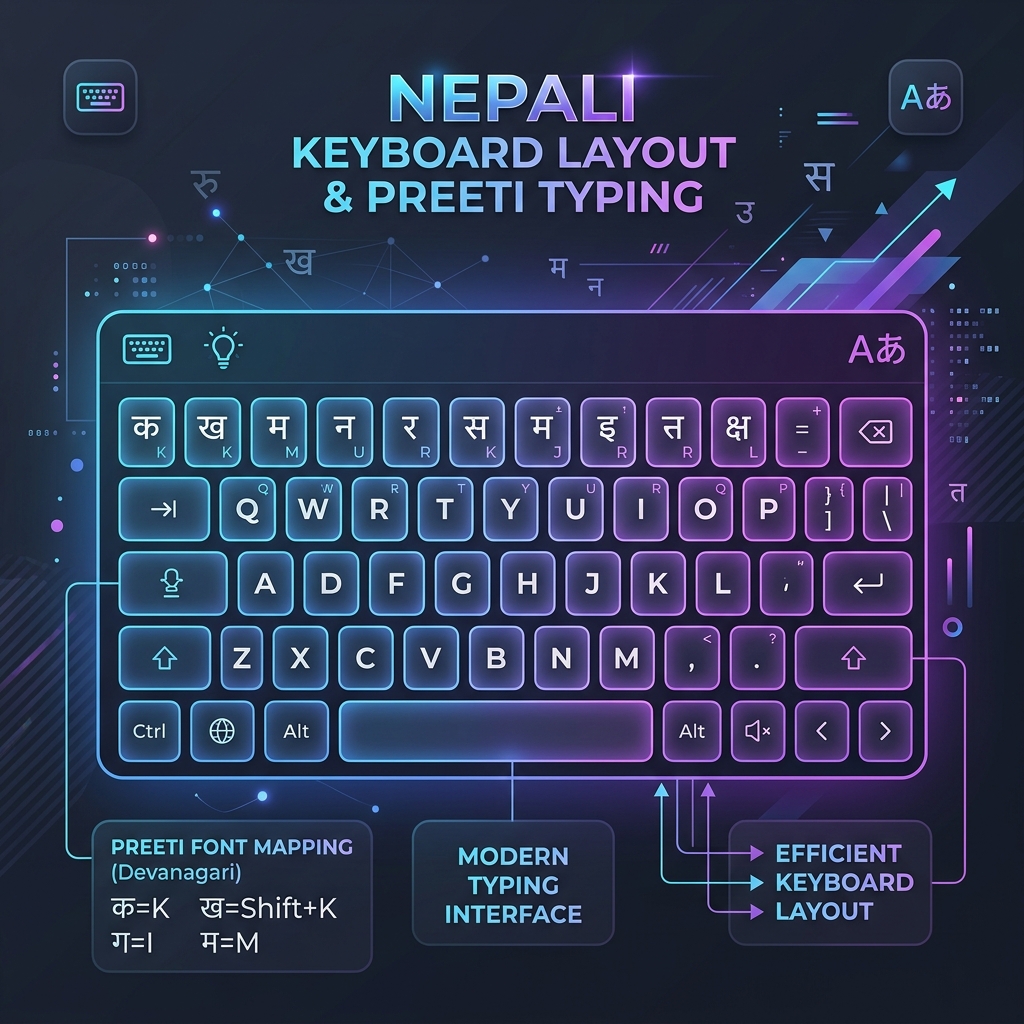
Visualizing the complex mapping required to translate legacy keystrokes into modern Unicode.
5. Features of the ToolkitsPlus Converter
Our dedicated Preeti to Unicode utility was engineered specifically to handle the nuances of the Nepali language with maximum accuracy. When designing the tool, we focused on several key features that set it apart from basic text swappers:
- Real-Time Conversion: As you paste or type your Preeti text, the Unicode equivalent is generated instantaneously. There are no loading screens or submit buttons required. This immediate feedback loop is crucial for proofreading and fast-paced editorial environments.
- Smart Ligature Handling: The Nepali language contains numerous complex conjunct consonants (like क्ष, त्र, ज्ञ). Our algorithm accurately detects the Preeti keystroke combinations for these specific ligatures and maps them perfectly to their Unicode equivalents, avoiding the dreaded "broken character" syndrome.
- Two-Way Translation: Need to go backward? Our tool supports Unicode to Preeti conversion as well. This is incredibly useful for digital journalists who receive Unicode text from reporters but need to format it using legacy fonts for the print edition of their newspaper.
- Formatting Preservation: While converting the core text, our tool attempts to maintain basic paragraph structuring, line breaks, and spacing, minimizing the amount of manual reformatting you need to do after the conversion is complete.
6. Step-by-Step Guide: How to Use the Converter
Using our converter is incredibly straightforward, designed for users of all technical skill levels. Here is the optimal workflow for converting your documents:
- Locate Your Source Text: Open your original document (whether it's a Microsoft Word file, a PDF, or an email). Ensure that you can highlight and copy the text. If the PDF is an image scan, you will need OCR software first; our tool converts encoded text, not pictures of text.
- Copy the Preeti Text: Highlight the desired paragraphs and press `Ctrl+C` (or `Cmd+C` on Mac). The text might look like English gibberish when copied to your clipboard—this is perfectly normal and expected.
- Paste into the Converter: Navigate to the ToolkitsPlus Preeti to Unicode tool. Click into the "Preeti" input box and press `Ctrl+V`.
- Review the Output: Instantly, the corresponding box will populate with perfectly formatted Nepali Unicode text. Take a moment to scan the output. Because of rare typographical anomalies in older documents, it's always wise to do a quick visual check.
- Copy and Use: Click the "Copy" button provided by the tool. You can now paste this Unicode text anywhere on the internet—Facebook, X (Twitter), WordPress blogs, or modern email clients—and it will display flawlessly.
7. Common Conversion Errors and How to Fix Them
Even with advanced algorithms, you might occasionally encounter slight errors when converting massive, heavily formatted documents. Here are the most common issues and how to resolve them:
- Misplaced Vowel Symbols (Matras): Sometimes, if the original typist used an unconventional keystroke order to force a visual appearance in Preeti, the converter might place a vowel (like the 'i' matra) on the wrong side of the consonant. A quick manual edit in the Unicode box resolves this.
- Special Characters: Punctuation marks, brackets, or specific mathematical symbols typed in Preeti might not always map cleanly to standard Unicode punctuation. Always double-check lists and numbered points.
- Mixed English and Nepali: If your original document contains English words typed in an Arial font mixed in with the Preeti font, copying both simultaneously can confuse the converter, as it will try to convert the English letters into Nepali Unicode. It is best to convert purely Nepali paragraphs at a time.
8. The Future of Nepali Typing
As mobile-first internet usage continues to dominate in Nepal, the relevance of legacy fonts like Preeti is slowly diminishing. New generations are learning to type using Romanized Unicode keyboards directly on their smartphones, completely bypassing the traditional Preeti layout. Technologies like Google Input Tools and built-in mobile keyboards have made typing in native Devanagari easier than ever.
However, until the massive archives of historical data, literature, and government documentation are fully digitized and transitioned to modern standards, tools like the Preeti to Unicode converter remain an absolute necessity. They are the vital translators between the past and the present digital era.
9. Conclusion
Mastering the transition from legacy fonts to modern Unicode is a fundamental skill for anyone working with digital content in Nepal today. By utilizing efficient, accurate conversion tools, you can ensure your writing, reporting, and documentation are accessible to a global audience across any device or platform. We invite you to bookmark the ToolkitsPlus converter to streamline your workflow and bring your Nepali content into the modern web era seamlessly.