

Key Takeaways
- ATS Compatibility is Crucial: Up to 75% of resumes are rejected by Applicant Tracking Systems before a human ever sees them. Using ATS-friendly templates ensures your application actually reaches the hiring manager.
- Avoid Over-Formatting: Complex graphics, multiple columns, and obscure fonts can confuse parsing algorithms. Stick to standard fonts, clear headings, and logical layouts.
- Leverage Built-in Tools: Modern free resume builders do more than format; they help you optimize word count, compress PDF exports, and compare text against job descriptions.
- PDF is the Standard: Always export your final resume as a PDF to preserve formatting across all devices and operating systems, unless the job description explicitly requests a different format.
- Data Privacy Matters: Choose a resume builder that respects your personal information and does not sell your data to third-party marketers without consent.
Understanding Applicant Tracking Systems (ATS)
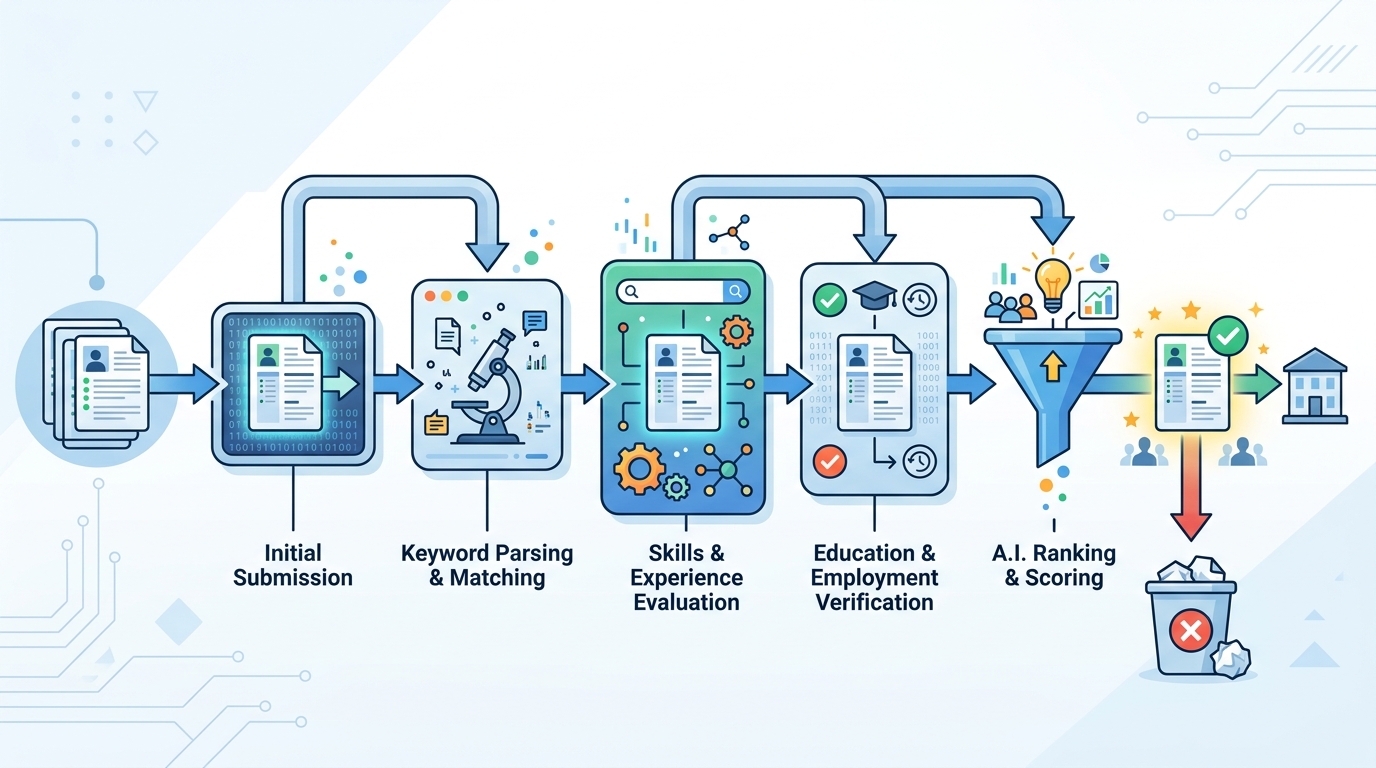
In today’s hyper-competitive job market, hitting the submit button on an application is just the first step in a complex digital journey. Before your resume lands on the desk of a hiring manager, it must survive the gauntlet of an Applicant Tracking System (ATS). An ATS is a software application that enables the electronic handling of recruitment needs. It parses, sorts, and ranks candidate resumes based on predefined criteria such as keywords, skills, former employers, years of experience, and educational background.
When an employer receives hundreds of applications for a single opening, manually reviewing each one is impossible. The ATS acts as a digital gatekeeper, filtering out unqualified candidates and bringing the most relevant profiles to the top. This means that even if you are the most qualified candidate in the world, an improperly formatted resume could cause the ATS to misread your information, resulting in an automatic rejection. According to leading career platforms like SHRM (Society for Human Resource Management), a massive percentage of large corporations rely on these systems.
This is exactly why finding the best free resume builder online is not just about aesthetics; it is about engineering a document that communicates effectively with both machines and humans. An ATS-friendly resume builder uses clean, semantic code in the background, ensuring that when the document is converted or parsed, the text remains intact and readable.
Why Your Resume Template Matters More Than You Think
It is tempting to use highly stylized, heavily graphic templates to stand out from the crowd. You might see templates featuring pie charts for skills, complex two-column layouts, custom icons, and unique typography. While these might look fantastic in a physical portfolio or as a printed handout at a networking event, they are a nightmare for parsing software.
When an ATS scans a document with multiple columns, it often reads straight across the page rather than down the column. This means your job title on the left side might be mashed together with a bullet point from the right side, creating a jumbled, incomprehensible mess. If the software cannot read your employment history properly, it will not assign you the correct score, and you will not advance to the next round.
The best free resume builder platforms solve this problem by offering templates that look professional to the human eye but use standard formatting rules. They employ standard bullet points (circles or squares, avoiding checkmarks or custom vectors), standard web-safe fonts (like Arial, Calibri, or Times New Roman), and clear, established headings like "Work Experience," "Education," and "Skills." By adhering to these conventions, ATS-friendly templates guarantee that your data is extracted perfectly.
Top Features of the Best Free Resume Builders
Not all resume builders are created equal. When evaluating the best free resume builder online, you should look for several core functionalities that go beyond simply filling out text boxes.
1. Pre-Written Phrases and Keyword Suggestions
One of the most challenging parts of writing a resume is figuring out exactly how to phrase your accomplishments. Top-tier builders offer industry-specific suggestions that are already optimized with action verbs and high-value keywords. This not only saves you time but helps you naturally incorporate the vocabulary that an ATS is actively hunting for.
2. Dynamic Content Formatting
As you add or remove content, the template should automatically adjust spacing and layout. This prevents awkward page breaks or overflowing text that looks unprofessional. You can also monitor your overall length using tools like our very own Word Counter Tool to ensure you are keeping descriptions concise and impactful.
3. Flexible Export Options
Once your masterpiece is complete, you need to export it. PDF is generally the safest format because it locks your formatting in place. However, some applicant systems specifically request a Word document (.docx). A superior online builder will allow you to download in multiple formats seamlessly.
Security and Privacy: Protecting Your Personal Data
Your resume contains a massive amount of sensitive personally identifiable information (PII). This includes your full name, phone number, email address, physical address, complete work history, and educational background. In the wrong hands, this is exactly the type of data malicious actors use for social engineering, identity theft, or targeted phishing attacks.
When choosing an online resume builder, it is critical to evaluate their privacy policy. Many "free" services make their money by harvesting user data and selling it to third-party brokers, recruitment agencies, or marketers. Before entering your life's history into a web form, verify that the platform complies with standard data protection regulations. Organizations like The Electronic Frontier Foundation (EFF) advocate strongly for user awareness regarding data handling.
A trustworthy platform will use encryption in transit (HTTPS) and at rest. If you are reviewing a platform and looking at the technical backend, you might notice modern authentication methods. For developers curious about how session tokens work securely in modern web apps, our JWT Decoder Tool provides insight into JSON Web Tokens often used in secure login systems. Remember, if a service looks suspicious, your data might not be safe. Reference standards from OWASP to understand web application security.
Essential Utilities to Perfect Your Resume
Crafting the perfect resume doesn't stop at the builder platform. There are several ancillary steps you should take before submitting your application package. Making sure your files are optimized and your content matches the job description will give you a significant edge.
Tailoring Content to the Job Description
You should never send the exact same resume to every employer. You need to align your skills and phrasing with the specific job post. A highly effective strategy is to copy the job description and your resume text and compare them side-by-side. You can easily do this using our Text Compare Tool. This allows you to visually identify missing keywords and ensure you are mirroring the language the employer uses.
Managing File Sizes
Some employer portals have strict file size limits, often capping uploads at 1MB or 2MB. If you have a detailed resume or included high-resolution formatting, your PDF might be too large. Instead of deleting important experience, you can use a utility like our PDF Compress Tool to reduce the file footprint without sacrificing visual quality.
Combining Application Materials
Often, job portals only allow you to upload a single document, but you want to include a customized cover letter, a list of references, or a portfolio snippet along with your ATS-friendly resume. Rather than cramming it all into one word processor document, generate them separately and merge them. You can seamlessly combine these documents using our PDF Merge Tool. Ensure the resume is the very first page of the merged document for the ATS to read.
Handling Unusual Data Requirements
In technical roles or when dealing with legacy proprietary systems, you might be asked to provide data in specific formats, or perhaps you need to extract and format data for a portfolio project. If you find yourself needing to structure data neatly, our JSON Formatter Tool or Base64 Encoder Tool can be surprisingly handy for technical job seekers preparing auxiliary materials. And if a job application form asks for your precise age in days for demographic reasons (though rare and often legally restricted), you could calculate it quickly with our Age Calculator Tool. For guidelines on what is legal to ask, consult resources from the Equal Employment Opportunity Commission (EEOC).
A Deep Dive into How ATS Parsing Algorithms Work
To truly appreciate why a specialized free resume builder is beneficial, one must understand the underlying mechanics of Applicant Tracking Systems. At their core, these systems rely on parsing algorithms and natural language processing (NLP) to convert a highly formatted visual document into structured database entries. This process involves stripping away all the design elements—colors, borders, specific fonts, and layout grids—leaving only raw text.
The system then applies heuristic rules to identify which block of text corresponds to which field in the employer's database. For instance, it looks for standard headers like "Education" or "Professional Experience" to delineate sections. If your resume uses a non-standard header like "My Journey" or "What I've Done," the algorithm might fail to recognize the subsequent text as your work history, completely omitting your experience from your digital profile.
Furthermore, dates are heavily scrutinized. An ATS tries to calculate your total years of experience by subtracting the start date from the end date of each role. If your dates are formatted inconsistently (e.g., mixing "Jan 2020" with "01/2020" or placing them in separate columns that parse incorrectly), the system might calculate zero years of experience, resulting in immediate rejection for mid-level or senior roles.
Building for Humans: The Secondary Audience
While optimizing for the ATS is non-negotiable, it is equally important to remember that the ultimate goal is to impress a human hiring manager. Once you pass the algorithmic filter, your resume must be easily scannable by a person who might dedicate only six to ten seconds to their initial review.
The best free resume builders strike a delicate balance between machine readability and human aesthetic appeal. They utilize ample white space, clear typographical hierarchies (where job titles are more prominent than descriptions), and bulleted lists to break up dense paragraphs. A monolithic wall of text, even if perfectly parsed by an ATS, will likely deter a fatigued recruiter.
To achieve this balance, focus on quantifiable achievements rather than mundane responsibilities. Instead of saying "Responsible for managing a team," write "Spearheaded a team of 15 engineers to deliver a critical project 3 weeks ahead of schedule, saving $50,000 in operational costs." This approach satisfies the ATS's hunger for keywords and provides the human reader with compelling evidence of your value.
Common Mistakes to Avoid When Using Resume Builders
Even with the most sophisticated tools at your disposal, human error can undermine your efforts. One of the most frequent mistakes is keyword stuffing. While including relevant keywords from the job description is essential, artificially injecting them in a way that disrupts the natural flow of the text is counterproductive. Modern ATS platforms are increasingly adept at detecting keyword stuffing and may penalize or flag applications that attempt to game the system.
Another pitfall is ignoring the file format. As mentioned earlier, submitting a complex Word document when a PDF is accepted can lead to formatting inconsistencies across different versions of Microsoft Office. Conversely, if an employer specifically requests a .docx file and you submit a PDF, you risk immediate disqualification for failing to follow instructions. Always adhere to the stated requirements, but default to a cleanly exported PDF from a reliable builder when given the choice.
Finally, failing to proofread is an unforgivable sin in the application process. An ATS might not care about a misspelled word if it doesn't impact a core keyword, but a human recruiter certainly will. Typographical errors communicate a lack of attention to detail. Utilize the spell-check features within your chosen resume builder, and always have a trusted colleague or friend review the final document before submission.
Frequently Asked Questions (FAQ)
What makes a resume template "ATS-friendly"?
An ATS-friendly template prioritizes clean text extraction. It avoids complex formatting like tables, multiple columns, headers/footers with essential information, graphics, and unconventional section titles. The underlying code of the file (like the PDF structure) is linear, allowing the parsing software to read the text sequentially from top to bottom exactly as a human would.
Is it really necessary to use a free online builder? Can't I just use Microsoft Word?
You absolutely can use Microsoft Word or Google Docs. However, a dedicated online resume builder streamlines the process by enforcing constraints that prevent you from making common ATS errors. Builders also provide integrated keyword suggestions, automatic formatting adjustments, and modern designs that are pre-tested against common parsing algorithms. It saves time and reduces anxiety.
Will an ATS penalize me for using a basic, boring design?
No. In fact, an ATS prefers a "boring" design. An ATS does not have eyes; it only processes text. While a human hiring manager will eventually see your resume, a clean, highly readable, and perfectly structured document is considered highly professional. Prioritize strong content, impactful verbs, and quantifiable achievements over flashy visuals.
Should I send my resume in PDF or Word format?
Always follow the instructions provided in the job listing. If no preference is stated, PDF is the gold standard. A PDF preserves your fonts, margins, and layout regardless of what device or operating system the recruiter is using. Modern Applicant Tracking Systems can easily parse text from a properly generated PDF. If you need to make your PDF smaller for upload, utilize tools like our PDF Compress Tool.
How do I know if my resume will pass the ATS?
While there is no way to guarantee a 100% pass rate since different companies use different software (like Workday, Taleo, or Greenhouse), you can test your document. Try copying all the text from your final PDF and pasting it into a plain text editor like Notepad. If the text appears garbled, out of order, or missing characters, the ATS will likely see the same mess. Clean up your formatting until the plain text version reads logically.